문제상황
전처리 서비스의 경우 모든 어플리케이션의 역할이 분리되어 안정성과 확장성을 향상 시켰다.
각 역할은 간단하게 아래와 같다.
- API 서버에서 전처리 요청
- Batch 서버에서 이벤트 발행
- Worker(카프카) 서버에서 분석 수행
요청부터 분석까지 API 서버만 사용하는 경우(동기)에는 모든 Trace Context가 이어져 추적이 가능하겠지만
위 처럼 역할이 분리되고 있는 경우 생성된 요청에 대해서 Batch 서버는 API서버의 어떤 요청에 대한 이벤트 발행인지 알 방법이 없다.
때문에 하나의 trace_id로 End to End에 대한 추적이 불가능한 상황이였다.
Trace Context
Datadog에서 Trace를 남길 때, Trace Context라는 것을 기준으로 Trace를 전파하도록 되어있다.
관련 문서 : 데이터독 공식문서
Trace Context에는 아래와 같은 값들이 존재한다.
x-datadog-trace-id- 의미: 전체 요청 흐름을 식별하는 고유한 추적 ID
- 용도: 하나의 사용자 요청이 여러 마이크로서비스를 거쳐가더라도 동일한 trace-id로 연결하여 전체 흐름을 추적
- 형태: 64비트 또는 128비트 정수 (보통 16진수로 표현)
x-datadog-parent-id- 의미: 현재 span의 부모 span ID
- 용도: 서비스 간 호출 관계와 계층 구조를 구성하는 데 사용
- 형태: 64비트 정수
x-datadog-origin- 의미: 추적이 시작된 원점/소스를 나타냄
- 용도: 추적의 출발점이 어디인지 식별 (예: 'synthetics', 'rum', 'lambda' 등)
- 예시:
synthetics,rum,lambda,profiling
x-datadog-sampling-priority- 의미: 해당 추적의 샘플링 우선순위
- 용도: 추적 데이터를 얼마나 중요하게 처리할지 결정
- 값:
-1: 자동 거부 (DROP)0: 자동 유지 (AUTO_REJECT)1: 자동 유지 (AUTO_KEEP)2: 사용자 유지 (USER_KEEP)
x-datadog-tags- 의미: 추적과 관련된 메타데이터 태그들
- 용도: 추적에 추가적인 컨텍스트 정보를 부여 (환경, 버전, 사용자 ID 등)
- 형태: 키-값 쌍들이 URL 인코딩된 형태 (예:
_dd.p.key1=value1,key2=value2)
Trace Context의 추출 및 복원
전처리 요청을 받을 때 Trace Context가 중단되고 Batch 어플리케이션에서 Trace Context를 불러오지 못하는게 근본적인 원인이다.
때문에 Trace Context를 추출하고, Trace Context가 끊겨있는 상황에서 복원시켜 이어주는 방식으로 구현한다.
Datadog Trace에 접근하기 위해서는 아래 의존성이 필요하다.
api 'com.datadoghq:dd-trace-ot:1.46.0'
api 'com.datadoghq:dd-trace-api:1.46.0'Trace Context를 추출 및 복원 하기 위해 TraceUtil 클래스를 정의하고 아래 함수를 작성한다.
Trace Context 추출
public static Map<String, String> extractTraceContext() {
    Tracer tracer = getTracer();
    Span span = getSpan();

    if (Objects.isNull(span)) {
        return Collections.emptyMap();
    }

    Map<String, String> contextMap = new HashMap<>();
    tracer.inject(span.context(), Format.Builtin.TEXT_MAP, new TextMapAdapter(contextMap));

    return contextMap;
}
Trace Context 복원
public static Span createSpanFromContext(String operationName, Map<String, String> contextMap) {
    Tracer tracer = getTracer();

    if (CollectionUtils.isEmpty(contextMap)) {
        return tracer.buildSpan(operationName).start();
    }

    try {
        SpanContext parentContext = tracer.extract(Format.Builtin.TEXT_MAP, new TextMapAdapter(contextMap));

        if (Objects.nonNull(parentContext)) {
            return tracer.buildSpan(operationName)
                    .asChildOf(parentContext)
                    .start();
        }
    } catch (Exception e) {
        // Context 추출 실패 시 새로운 Span 생성
    }

    return tracer.buildSpan(operationName).start();
}
복원한 Trace Context의 Span 활성화
public static io.opentracing.Scope activateSpan(Span span) {
    return getTracer().activateSpan(span);
}
추출한 Trace Context 저장
TraceUtil을 통해 추출 및 복원 코드를 작성했으면 추출한 Trace Context를 저장한다.
Redis를 사용하여 Aggregate root의 ID와 Trace Context를 매핑 시켜 사용하면 좋겠지만 현재 Redis를 사용하지 않는 서비스에 이것만을 위해 연동하기에는 무리가 있다.
따라서 RDB에 저장하도록 한다.
Trace Context는 아래 테이블들에 저장하도록한다.
- Aggregate root인 PreprocessJob생성 시 저장
- 이벤트 발행 시 편의상으로 Outbox 테이블에 저장
- outbox 테이블에 저장하지 않는 경우 이벤트 발행 시 마다 PreprocessJob을 조회해야한다.
예시 코드
@Slf4j
@Service
@RequiredArgsConstructor
public class PreprocessJobCreateService {

    //...의존성 코드

    @Transactional
    public PreprocessJob create(CreatePreprocessJobCommand command) {
        TraceContext traceContext = new TraceContext(TraceUtil.extractTraceContext());

        PreprocessJob preprocessJob = PreprocessJob.create(
                //.. 기타 필드
                traceContext
        );
        // Aggregate Root
        PreprocessJob savedJob = preprocessJobRepository.save(preprocessJob);

        //outbox
        outboxRepository.save(PreprocessJobCreatedOutbox.create(savedJob, traceContext));

        return savedJob;
} 추출한 Trace Context 복원
이제 Trace가 끊기는 포인트에 Trace Context를 복원한다.
복원 후에는 복원한 Span을 Active하여 비즈니스 로직을 포함할 수 있도록 해야한다.
Span을 active, finish 하지 않은 경우에는 같은 Trace에 비즈니스 로직이 감지되지 않는다.
나는 TraceContext에서 특정 값을 추출하는 로직의 처리를 위해 VO로 만들었다.
TraceContext.java
public record TraceContext(Map<String, String> value) {

    private static final String TRACE_ID_KEY = "x-datadog-trace-id";

    public String getTraceId() {
        if (value.containsKey(TRACE_ID_KEY)) {
            return value.get(TRACE_ID_KEY);
        }

        return "";
    }
}
복원 예시 코드는 아래와 같다.
@Slf4j
@Service
@RequiredArgsConstructor
public class ExtractSentenceService {

    //... 의존성

    public PreprocessJobId extract(SentenceExtractCommand command) {
        PreprocessJob job = jobReader.readById(jobId);
        TraceContext traceContext = job.getTraceContext();
        Span span = TraceUtil.createSpanFromContext("extract sentence", traceContext.value()); // Trace Context 복원
        try (Scope scope = TraceUtil.activateSpan(span)) {  // Span Activce
              // 비즈니스 로직
        } finally {
            span.finish();  // Span Finish
        }
    }
}개선
Trace Context를 복원하고 Span을 Activce 하는 코드가 모든 비즈니스 로직에 들어가야 하기 때문에 매번 Trace와 관련된 코드가 반복되고 비즈니스 코드에 집중할 수 없는 문제가 발생한다.
이 부분을 AOP를 통해 개선했다.
Trace를 적용할 함수를 지정하기 위해 annotation을 정의한다.
DatadogTrace.java
@Target(ElementType.METHOD)
@Retention(RetentionPolicy.RUNTIME)
public @interface DatadogTrace {

    String operationName() default "";
}operationName은 Trace에 남길 작업명을 기재한다.
Aspect클래스를 정의한다.
@Around("@annotation(datadogTrace)")
public Object traceSpan(ProceedingJoinPoint joinPoint, DatadogTrace datadogTrace) throws Throwable {

}이제 Aspect 클래스에서 TraceContext객체를 가져와야한다.
내가 생각한 방식은 두 가지 방법이 있었다.
- Spring Expression을 통해 Arguments에서 가져오는 방법
- 참고문서 : Redisson 분산락 적용 방법
- 인터페이스를 정의해 Arguments를 추상화 하는 방법
나는 2번 방식을 선택했다.
그 이유는 1번 방식은 literal하게 Spring Expression을 관리해야 했고 파싱하기 위해 Parser를 추가로 개발해야하는 부분보다 2번 방식이 직관적이고 유지보수 측명으로 더 낫다고 판단했다.
인터페이스는 TraceContext를 가져온다는 의미로 TraceContextProvider라고 정의했다.
public interface TraceContextProvider {

    TraceContext traceContext();
}그리고 TraceContext를 가지고 있는 객체에 TraceContextProvider를 상속한다.
@Getter
public class PreprocessJob implements TraceContextProvider {
    //... 추가 코드
}그럼 이제 다음과 같이 TraceContext를 추출 할 수 있다.
@Around("@annotation(datadogTrace)")
public Object traceSpan(ProceedingJoinPoint joinPoint, DatadogTrace datadogTrace) throws Throwable {
    MethodSignature signature = (MethodSignature) joinPoint.getSignature();
    Method method = signature.getMethod();
    Object[] args = joinPoint.getArgs();

    String operationName = determineOperationName(datadogTrace, method);
    TraceContext traceContext = extractTraceContextFromArgs(args);
    Span span = TraceUtil.createSpanFromContext(operationName, traceContext.value());

try (Scope scope = TraceUtil.activateSpan(span)) {
    return joinPoint.proceed();
} finally {
    span.finish();
}
}

private String determineOperationName(DatadogTrace datadogTrace, Method method) {
    return Optional.ofNullable(datadogTrace.operationName())
            .filter(name -> !name.isBlank())
            .orElse(method.getDeclaringClass().getSimpleName() + "." + method.getName());
}

private TraceContext extractTraceContextFromArgs(Object[] args) {
    return Arrays.stream(args)
            .filter(TraceContextProvider.class::isInstance)
            .map(TraceContextProvider.class::cast)
            .findFirst()
            .map(TraceContextProvider::traceContext)
            .orElse(new TraceContext(TraceUtil.extractTraceContext()));
}operationName은 존재하지 않는 경우 {클래스명.메소드명}의 형식으로 적용했다.traceContext는 존재하지 않는 경우 현재 Trace Context를 추출하여 넣도록 했다.
예외처리
에러가 발생한 경우 Span에 에러를 표시하기 위해서는 에러 발생 시 Span에 Tag를 추가로 작성해야 한다.
때문에 catch문으로 에러 발생 시 태그를 추가로 에러 정보를 담을 수 있도록 한다.
@Around("@annotation(datadogTrace)")
public Object traceSpan(ProceedingJoinPoint joinPoint, DatadogTrace datadogTrace) throws Throwable {
    MethodSignature signature = (MethodSignature) joinPoint.getSignature();
    Method method = signature.getMethod();
    Object[] args = joinPoint.getArgs();

    String operationName = determineOperationName(datadogTrace, method);
    TraceContext traceContext = extractTraceContextFromArgs(args);
    Span span = TraceUtil.createSpanFromContext(operationName, traceContext.value());

try (Scope scope = TraceUtil.activateSpan(span)) {
    return joinPoint.proceed();
} catch (Throwable throwable) {
    span.setTag("error", true);
    span.setTag("error.msg", throwable.getMessage());
    span.setTag("error.kind", throwable.getClass().getSimpleName());
    span.setTag("error.stack", getStackTrace(throwable));
    span.setTag("method.name", method.getName());
    span.setTag("class.name", method.getDeclaringClass().getSimpleName());

    throw throwable;
} finally {
    span.finish();
}
}데이터독 결과 확인
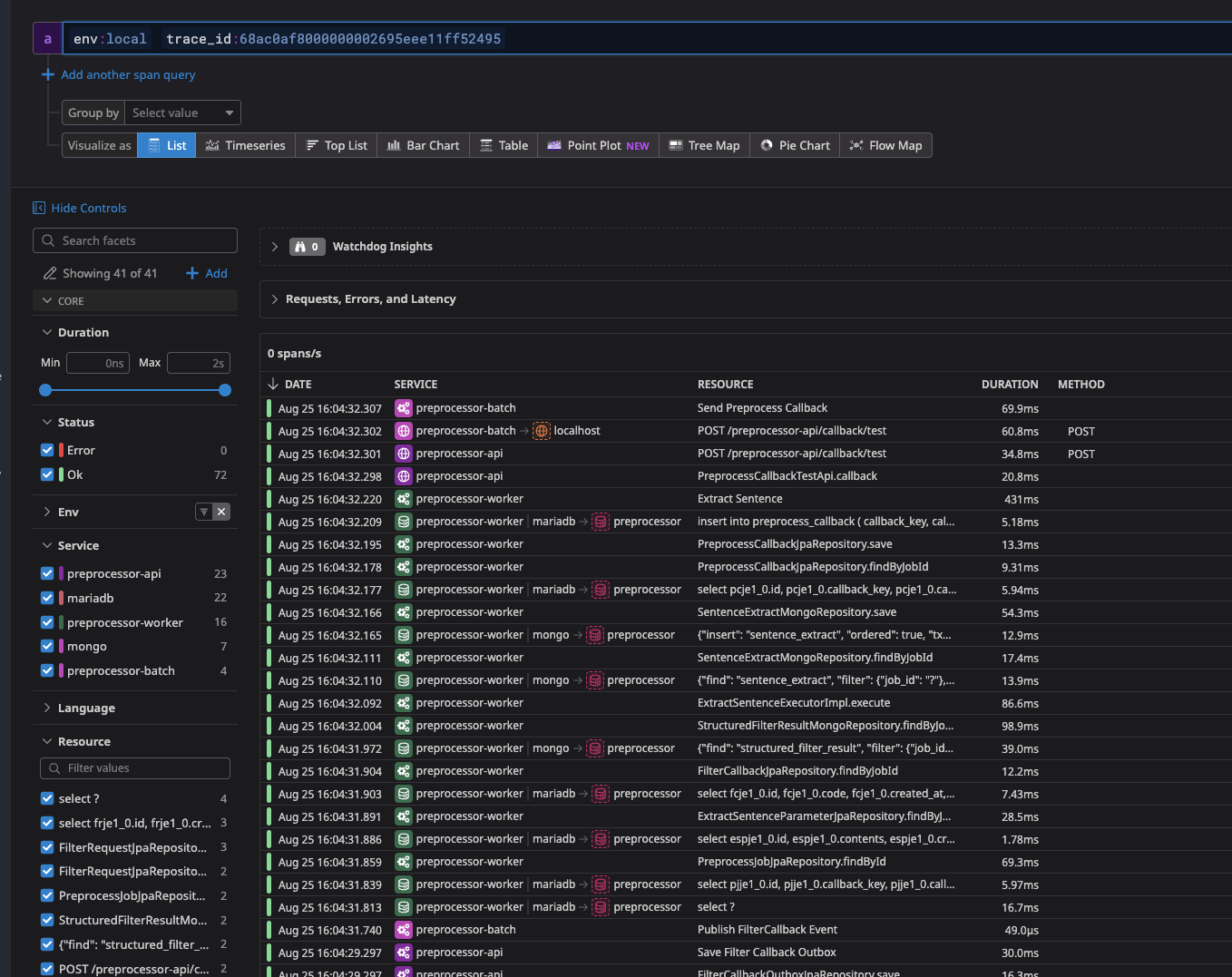
PreprocessJob 생성 (/preprocessor-api/request) 요청 시
API, Batch, Worker의 모든 흐름이 하나의 trace_id로 확인이 가능하다.

'백엔드 > 분산추적' 카테고리의 다른 글
| Datadog Trace 로컬 환경 설정 (1) | 2025.09.05 |
|---|